KOR
Takeoff · Estimate · Schedule · Tasks

Your takeoff in a day and a half. Not five.

KOR connects your plans, takeoff, estimate and schedule. Measure a wall once: studs, drywall, insulation, paint, prices and durations follow.

No credit card · Sample project included · In English and French

Plans and takeoff in KOR: plan sheets, measurements and calculated materials
Measure once

One line on the plan, everything else follows

Templates do the repetitive work: each measured item gives its materials, prices and duration. Fix a measurement and everything updates. Spacing, waste, heights: the rules are yours to change.

1 · Measure

The wall on the plan

  • 136 lin. ft of 2x6 exterior wall
  • 8'-1" high
  • scale read from the plan
2 · Calculate

The template lists materials

  • 114 2x6 studs × 8'136 ft ÷ 16" o.c. = 102, + 1 end stud, + 10% waste
  • 449 lin. ft of plates136 ft × 3 (bottom + double top) + 10% waste
  • 38 sheets of 4x8 OSB136 ft × 8'-1" ÷ 32 sq. ft, + 10% waste
  • Drywall, insulation and paintreuse the same 136 ft (linked items)
3 · Price and schedule

Prices and durations follow

  • prices from your price bank
  • GST / QST calculated
  • 2 days of framing proposed
  • in the starting schedule
5 days → 1½ days

For a full house takeoff: measure each item once, and templates calculate every material instead of working it out by hand.

Plan sets

A big plan set, named on its own.

Drop in the PDF: KOR reads each sheet's title block, finds its number, title and scale, and sorts the sheets by discipline. No more renaming pages one by one.

  • Number and title read from the title block (A-101 · Foundation plan)
  • Scale found on the sheet (1/4" = 1'-0", 1:50…), confirmed in one click
  • Sheets sorted by discipline: architectural, structural, mechanical…
  • Check against a known dimension; scanned plans calibrated by hand
  • File fingerprint: you always know which revision is open
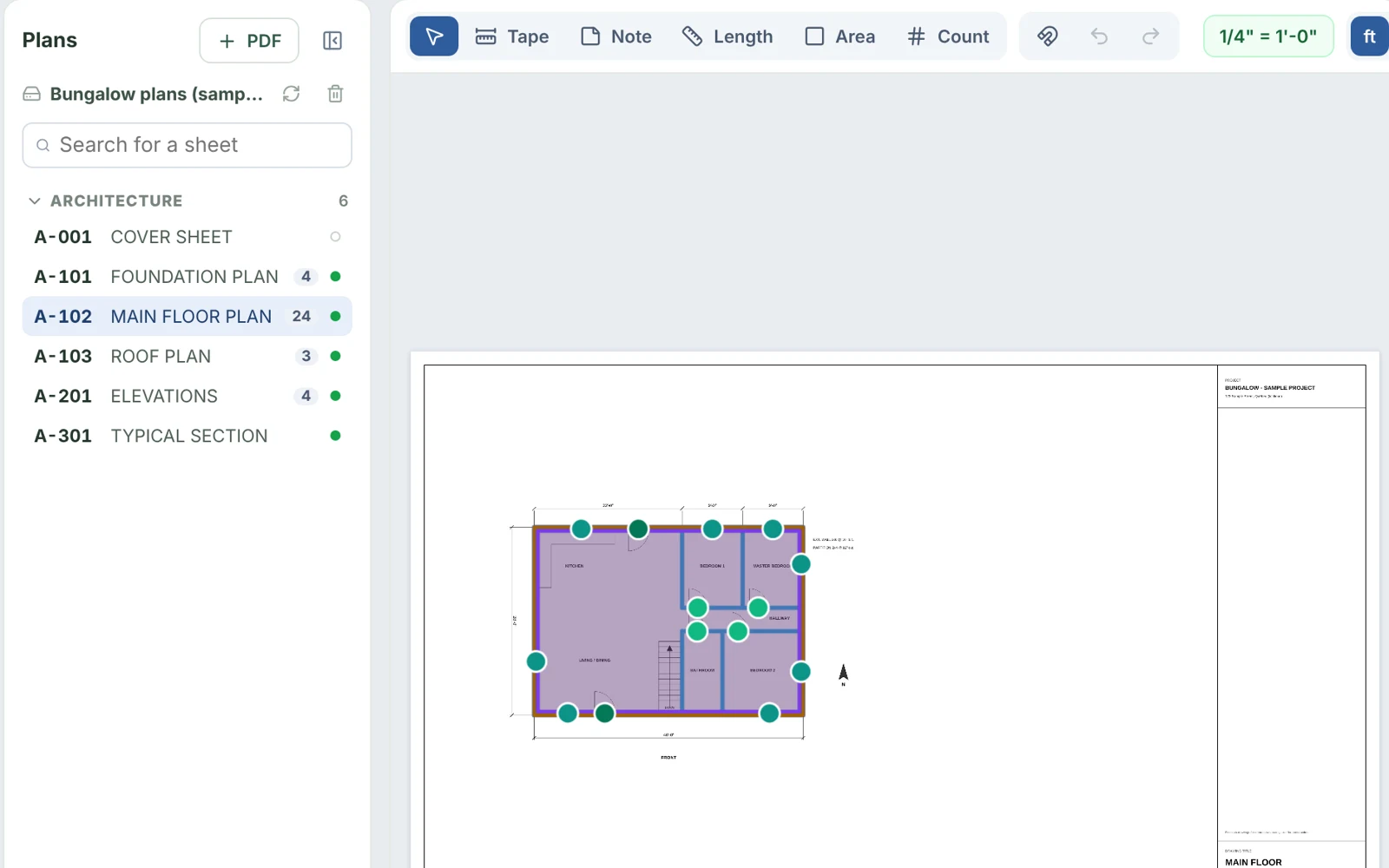
Plan sheets named and scale detected automatically in KOR
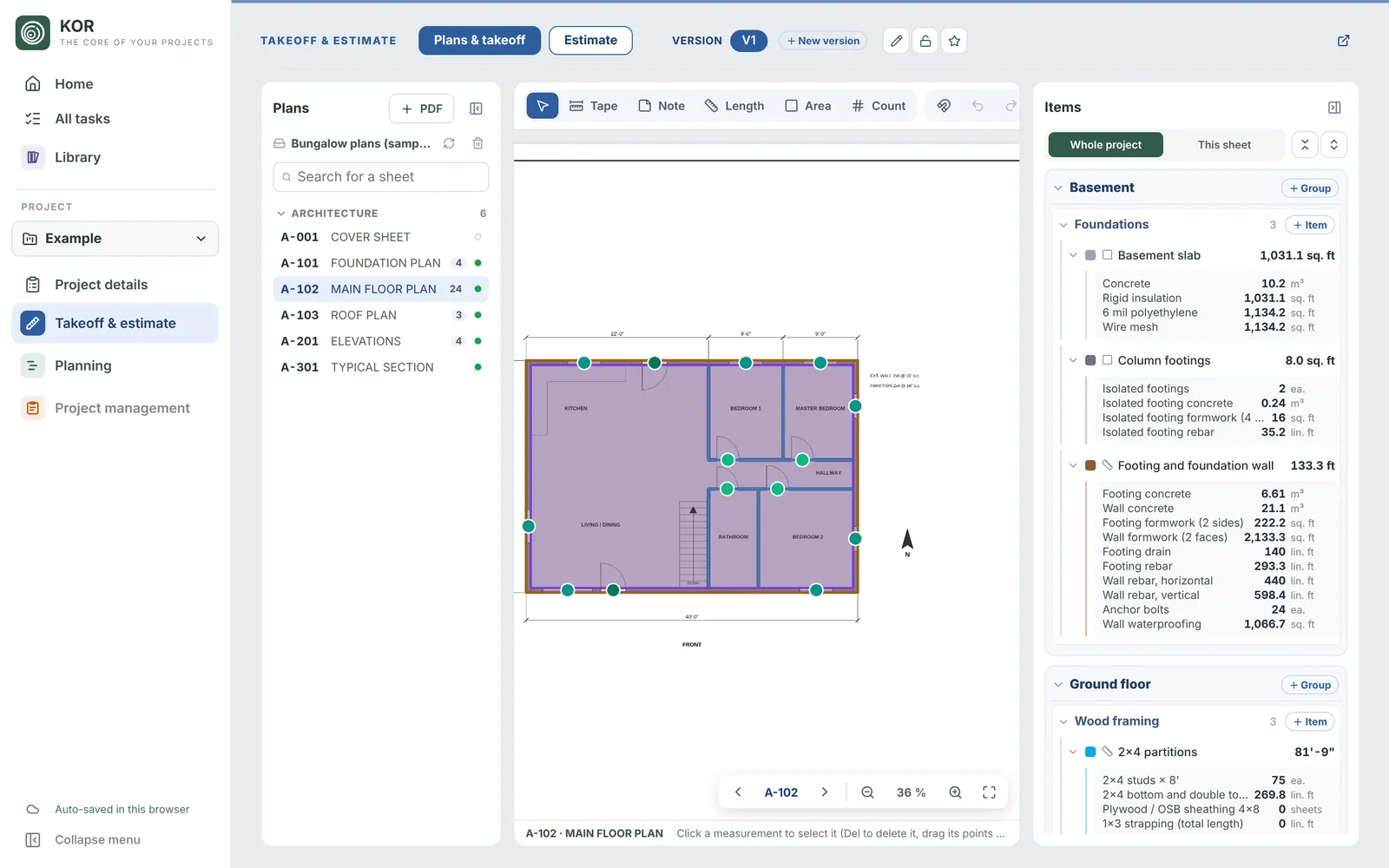
Plans & takeoff

Open the PDF, measure. KOR does the rest.

Lengths, areas and counts right on your plans, with templates that calculate every material.

  • Large PDFs stay smooth: sharp zoom, pages drawn on demand
  • Ready-made templates for framing, drywall, insulation, foundations, roofing and more
  • Linked items reuse measurements: measure walls once, drywall and paint follow
  • Rectangles, circles, arcs, holes in an area, snapping to plan lines
  • Spec notes boxed on the plan, found again in the estimate
Plans and takeoff in KOR
Estimate

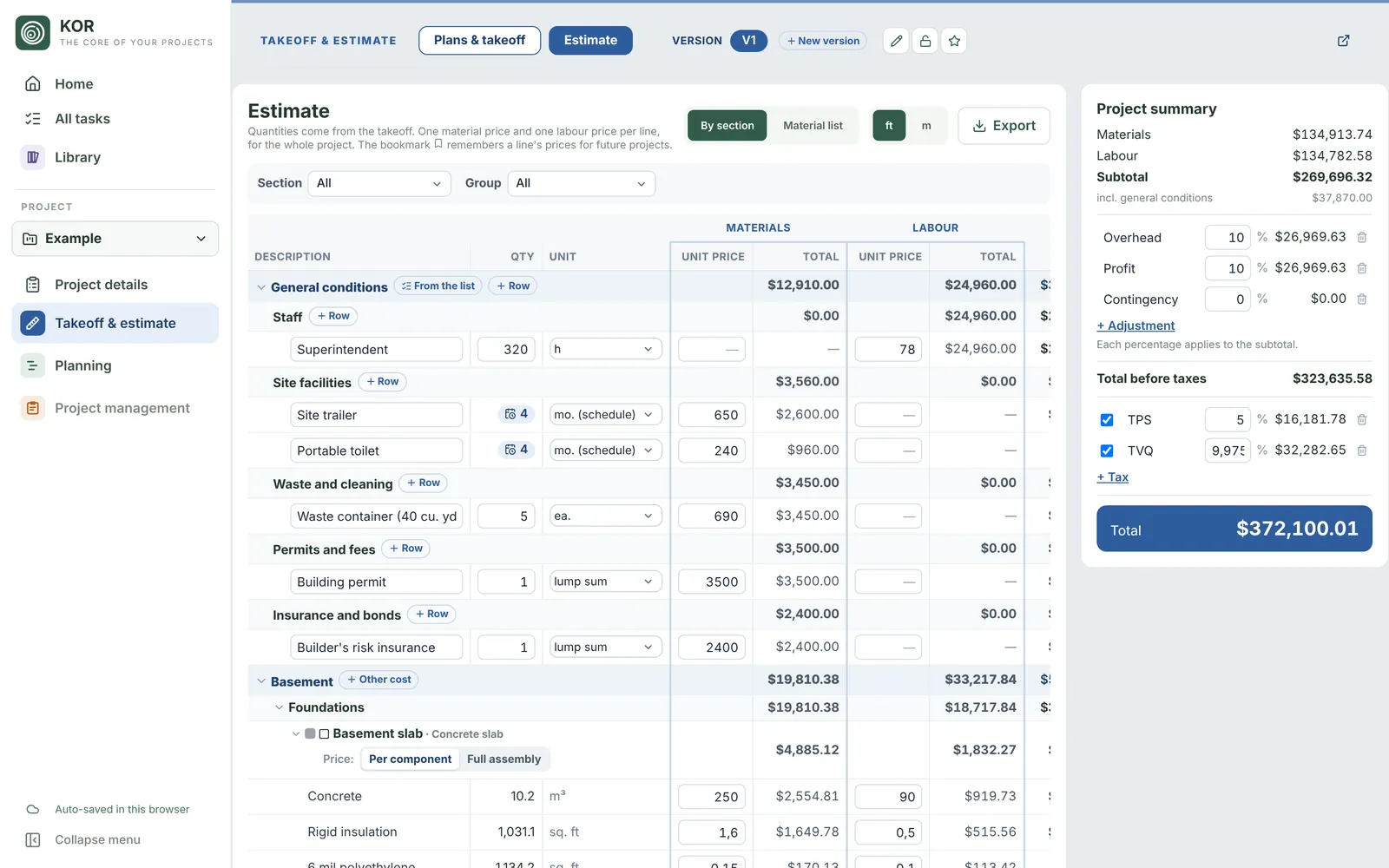
Quantities arrive on their own. You add the prices.

Every calculated material becomes an estimate line, by section and by trade.

  • Material and labour prices, kept separate
  • Company price bank: your prices carry over from project to project
  • General conditions, overhead, profit, contingency
  • GST, QST or HST based on the site's province
  • Versions (V1, V2 after addenda) and side-by-side comparison
Estimate in KOR
Exports

Exports you can send as they are.

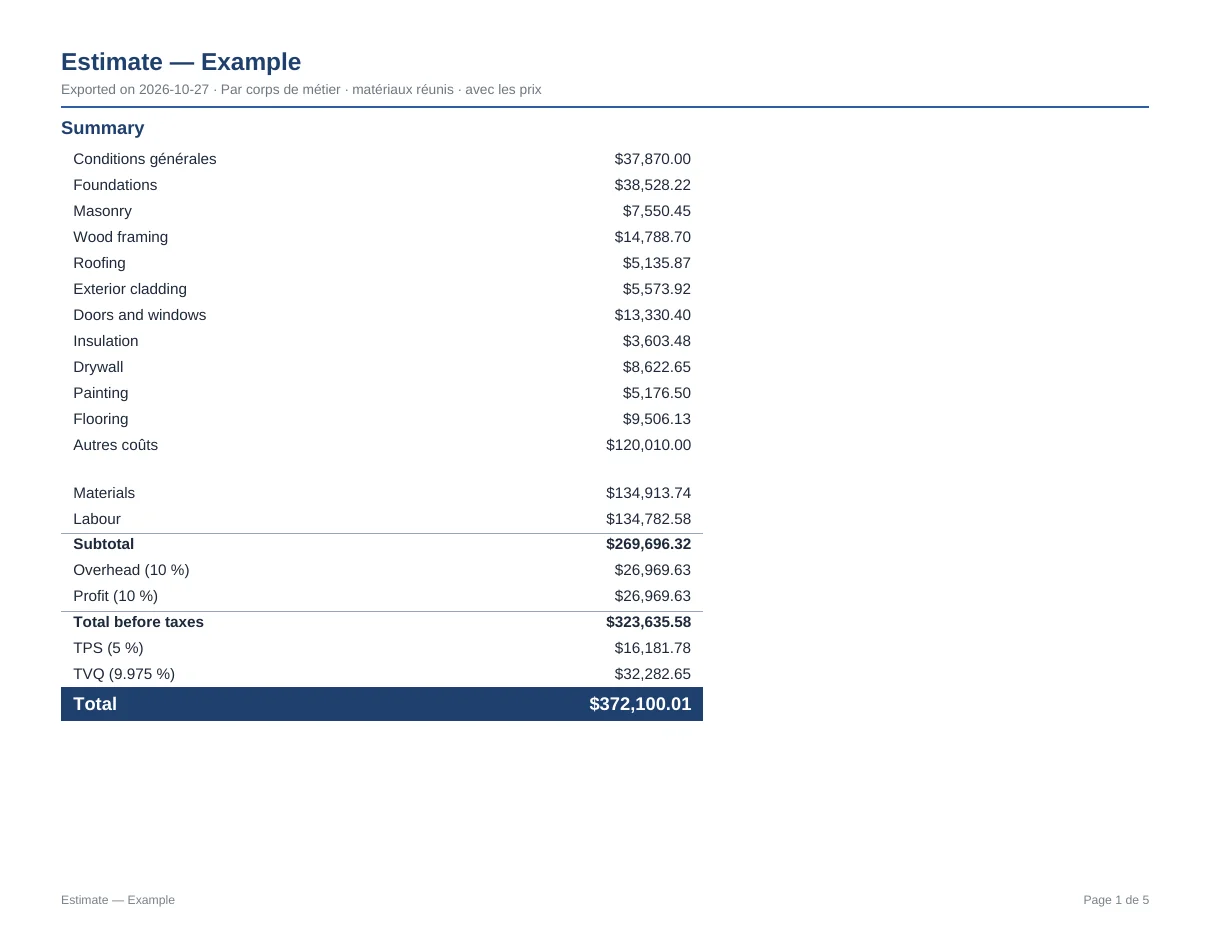
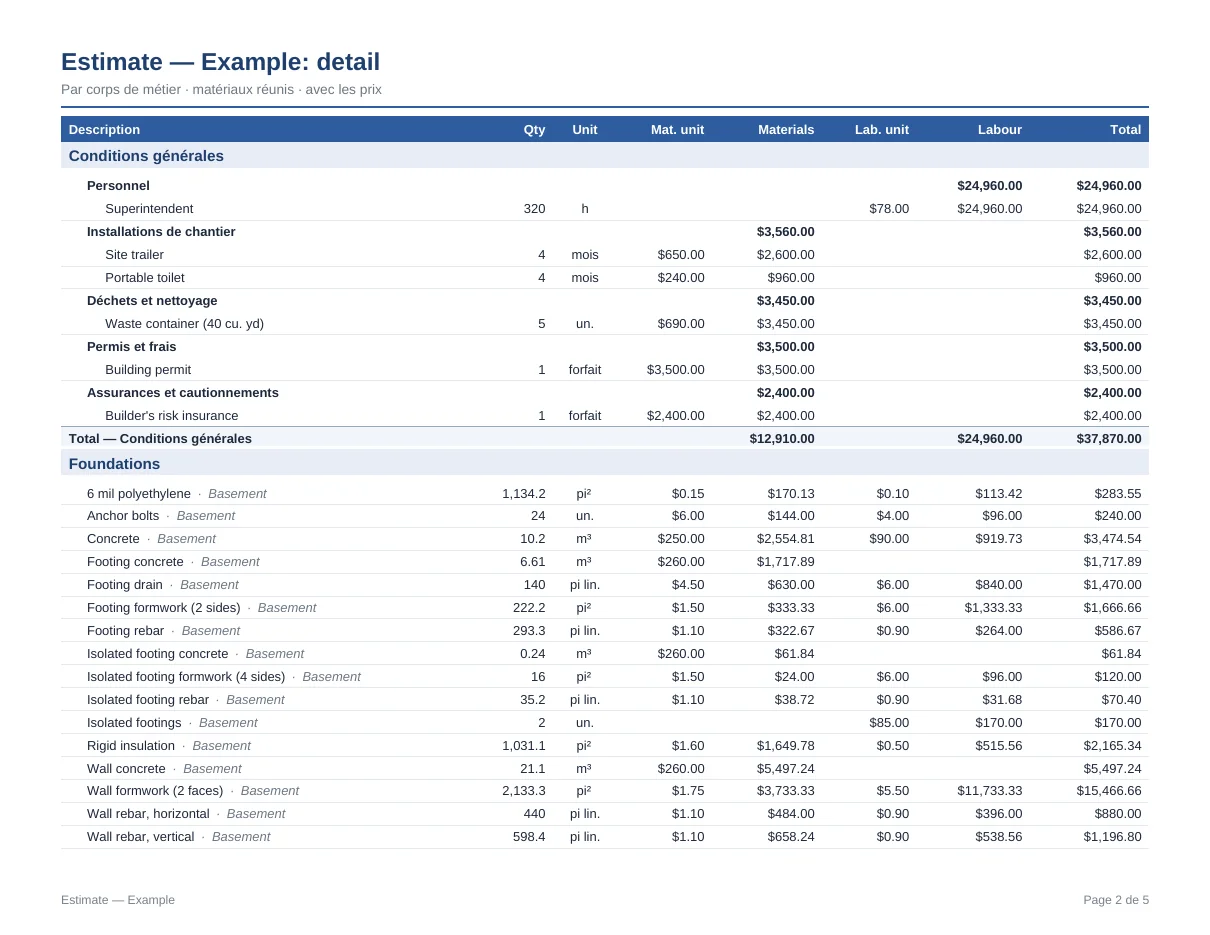
Excel with real formulas, a clean paginated PDF, ready for the client or the supplier.

  • Excel: every total is a formula, change a price and everything recalculates
  • Letter-size PDF with summary, detail by trade and numbered pages
  • Client version: one amount per trade, markups spread
  • Quantities only, to request supplier pricing
  • Your logo and contact details on every page
Summary page of an estimate exported to PDFDetail page of an estimate exported to PDF
Schedule

A real construction schedule, easy to keep up to date.

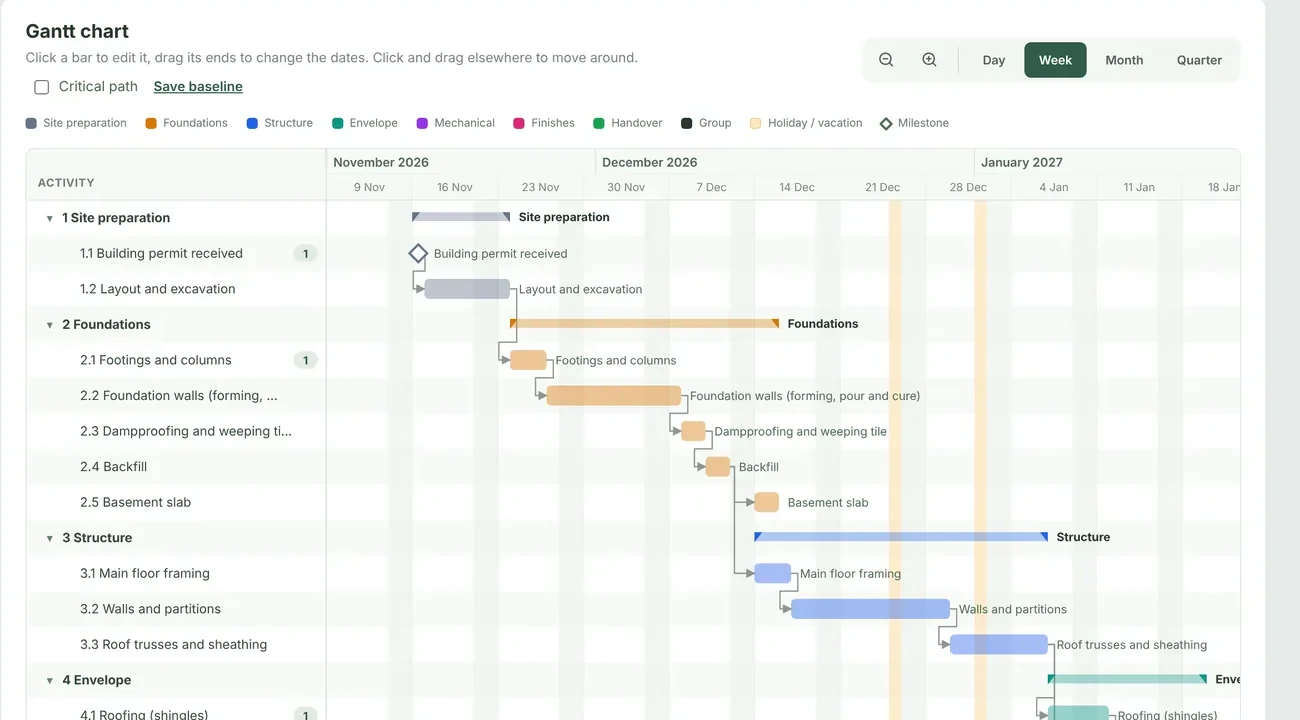
A full Gantt chart built for residential construction: drag a bar and linked activities follow.

  • Finish → Start, Start → Start, Finish → Finish links, with lag or overlap
  • Critical path, float and milestones
  • Drag and drop: move a bar, change its duration, reorder rows
  • Groups and subgroups (floors, phases), colours by phase, a contractor per activity
  • Late activities and "Update to today", a baseline to see the slippage
  • Statutory holidays and Québec's construction holiday already excluded
  • PDF export by period, by contractor, on letter, legal or tabloid
Gantt chart of the schedule in KOR
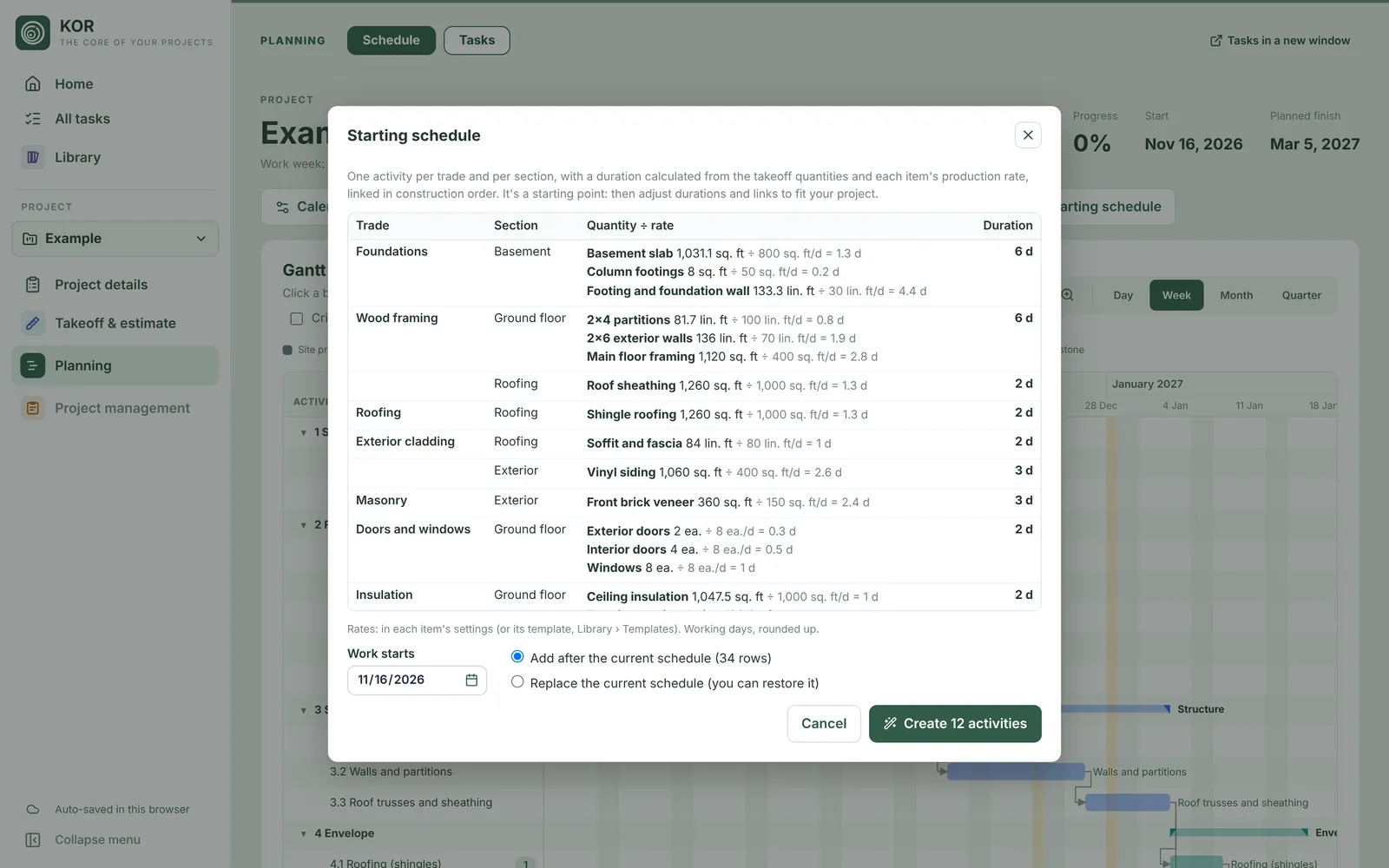
Starting schedule

Your quantities give the durations.

Duration = quantity ÷ production rate. One click creates activities by trade and by floor, linked in construction order.

  • Starter production rates included, editable per template or per item
  • Number of crews per item
  • When quantities change, KOR proposes new durations without forcing anything
  • Add to an existing schedule or start fresh
Starting schedule created from the takeoff
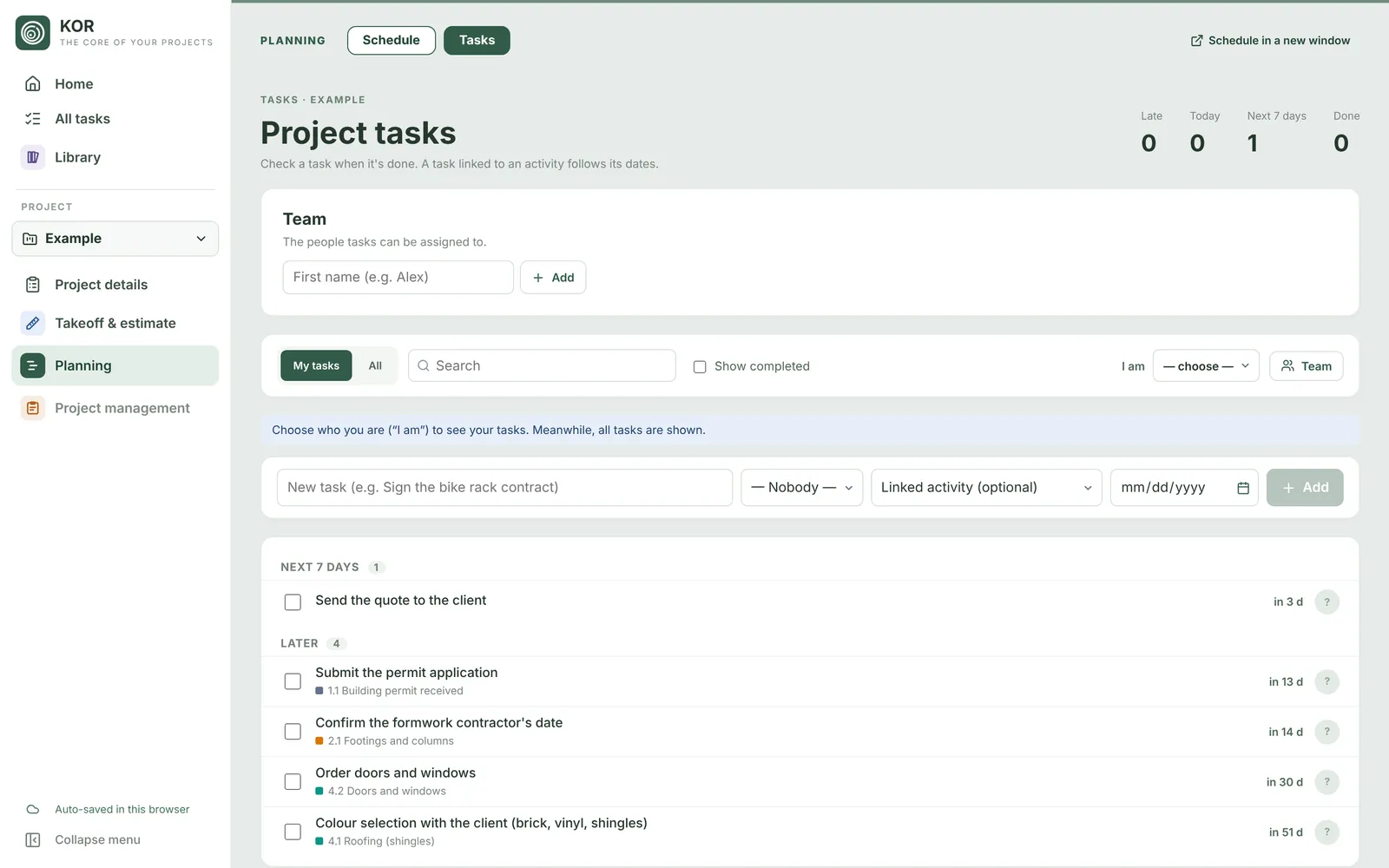
Tasks

Tasks follow the job.

Assign a task to someone and link it to an activity: if the activity moves, the due date moves too.

  • My tasks, overdue, today, this week
  • Fixed due dates or linked to an activity (e.g. 2 weeks before it starts)
  • Dated comments and your company's team
  • All projects together on the home screen
Tasks in KOR
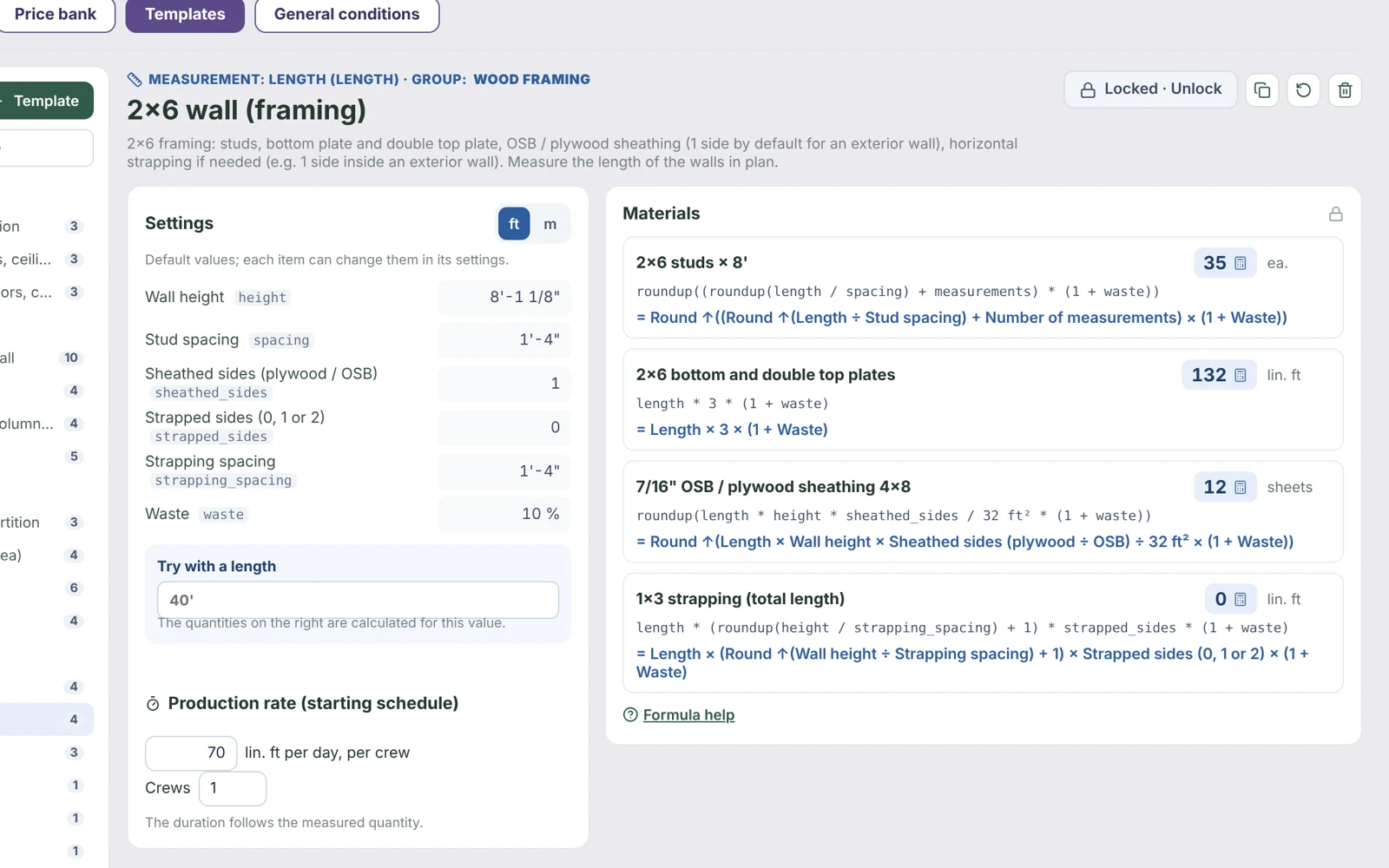
Company library

Your company's memory.

Your ways of calculating, your prices, your general conditions and your contacts stay in KOR. Every project goes faster than the last, and when someone leaves the team, their methods stay.

  • Templates: your formulas, waste and spacing, locked against mistakes
  • Price bank: keep a price in one click from the estimate, it comes back on the next project
  • General conditions: project manager, site trailer, dumpster… added to any estimate in one click
  • Contacts: companies, people and trades, Excel import; offered as contractors in the schedule
Template library in KOR
Made in Québec

Built for contractors in Canada

English and French

The whole app, template formulas and exports, in each person's language.

Taxes and holidays

GST, QST and HST by province, statutory holidays, Québec's construction holiday; US holidays and sales tax too.

Imperial and metric

12'-6", 3.81 m or 3810 mm: type it the way you say it, KOR converts exactly.

Offline

On site with no signal, keep working; everything syncs when you're back online.

Tablet and phone

Install KOR like an app, no app store needed.

Your data in Canada

Database hosted in Canada; each company only ever sees its own data.

In the works

What's next for KOR

Two modules are in the works. They will plug into KOR, with your projects, contacts and estimates already in place.

In the works

1 · Bidding

One bid package per project (plans, specs, addenda) sent to your subcontractors by trade. They answer without creating an account; you compare bids side by side, with exclusions priced in, and the winning price flows into the estimate.

In the works

2 · Project management

Documents and plan versions, contracts, change orders, site diary, deficiencies and budget, connected to the schedule and the estimate.

Pricing

One plan, everything included

$69 / month

Extra user: $10 / month. Taxes extra. Cancel anytime.

Start the 14-day trial

After the trial, without a subscription, your projects stay viewable and exportable: nothing is deleted.

  • Plans and takeoff, templates
  • Estimate, price bank, Excel and PDF exports
  • Schedule, starting schedule, tasks
  • Contacts, general conditions, versions
  • 3 users included

Frequently asked questions

Do I need a credit card for the trial?

No. The 14-day trial includes everything, with a sample project already measured, priced and scheduled so you can see KOR in action.

Is my data safe?

The database is hosted in Canada. Each company only sees its own data, checked by automated tests before every update. You can export your projects at any time.

What happens if I stop my subscription?

Your projects become read-only: you can still view and export them. Nothing is deleted. Subscribe again and everything is editable again.

Can I use my own prices and methods?

Yes. The starter templates are a starting point: change formulas, waste, spacing, add your own templates. Your prices stay in your company's price bank.

Does it work on a tablet?

Yes, in the browser or installed as an app. Takeoff works best on a computer or a large tablet; on site, the phone is for plans, the schedule and tasks.

Can I import my contacts?

Yes, with our Excel template: fill it in (by hand or with an AI) and import it in seconds.

How many users?

The plan includes 3 users (you and two colleagues). Each additional person is $10 per month.

Try KOR on your next bid

14 days free, a sample project to start, and your own plans from day one.